
Gobo
Private calendar blocking for the Mac
Your colleagues book meetings by what your work calendar shows; your dentist and your kid's recital live on calendars it can't see. Gobo mirrors them onto it as plain Busy blocks. No titles, no details. Just the time.
Download on the Mac App Store- One-time purchase
- No subscription, no account
- No IT approval
- macOS 14 or later
Flip a switch and watch your work calendar.
On the left, a Tuesday on a personal calendar. On the right, the same day on a work calendar, as a colleague sees it. Mark something Free and its block disappears; mark it Busy and it comes back.
Buffers follow the default rule: only events with a location get them, so the phone call doesn't. In the app the change lands on the next sync, which runs as soon as you flip the switch.
Built inside the problem
My personal life is in iCloud. My work calendar lives in a university tenant I don't administer, and the IT department that runs it (reasonably) refuses third-party OAuth grants. Every calendar sync service fails at exactly that wall, because every one of them needs permission from the work side.
Gobo doesn't ask. It runs entirely on your Mac, through the same built-in calendar access Apple's own Calendar app uses; if your work calendar is on your Mac, Gobo can protect your time. Five minutes to set up. No ticket, and nothing for an administrator to block.
Set it up once. Then it gets out of the way.
After that, Gobo lives in the menu bar. It syncs every 15 minutes, again whenever your calendars change, and does a full pass overnight. Move a dentist appointment and its block moves with it; cancel it and the block goes away.
What reaches your work calendar
- The start and end time
- A title you choose (“Busy” by default)
- Availability set to Busy
- A note reading “This busy block is managed by Gobo,” with an anonymous code so Gobo can find its own blocks
What stays on your Mac
- The event title
- Location
- Notes and links
- Attendees
- Which calendar it came from
- Alerts
Everything is one menu bar icon away.
Gobo is a small menu bar app with a single settings window. Here are the parts you'll actually use.
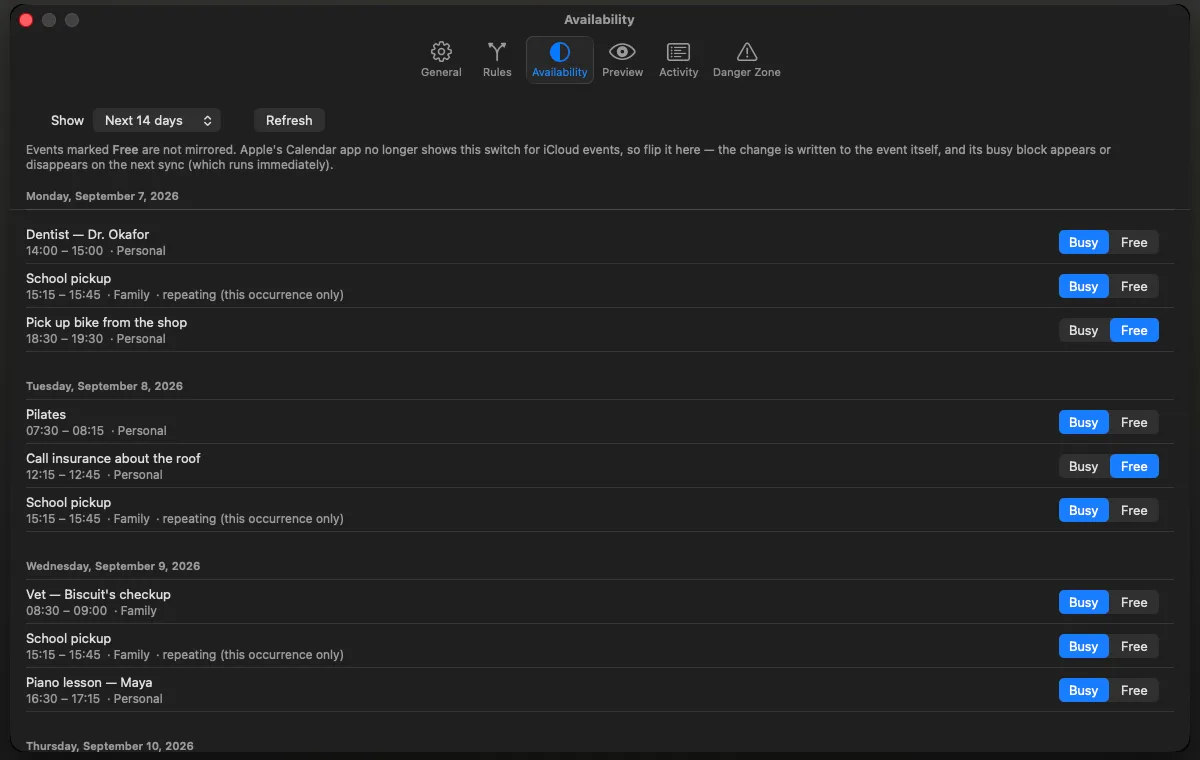
The Busy/Free switch Apple took away
Apple's Calendar app no longer lets you mark an iCloud event Free or Busy on the Mac. Gobo gives the switch back: flip any upcoming event from inside the app, and its busy block appears or disappears on the spot.
The flag is written to the event itself, so it stays with the event wherever that calendar syncs. For a repeating event, the switch changes only that occurrence; next week's piano lesson is still Busy. Exchange events keep their own “Show As” control in Calendar, and Gobo respects that too.
Every setting, explained.
The defaults are what most people want. Here is everything you can change, and what it does.
Rules
A rule takes events from one or more source calendars and blocks time on one target. You can have as many rules as you like, each with its own filters and buffers.
| Setting | What it does | Default |
|---|---|---|
| Sources | The calendars whose events should block time. | Chosen in setup |
| Target | The calendar the blocks go on, usually the one colleagues check. Read-only and subscribed calendars aren't offered, because Gobo can't write to them. | Chosen in setup |
| Mirror title | What each block is called on the work side. | Busy |
| Days back / ahead | How far around today Gobo looks: up to 30 days back and 365 ahead. | 1 / 90 |
Filters
What doesn't get mirrored.
| Setting | What it does | Default |
|---|---|---|
| Skip events marked Free | The main switch. Anything non-committal, marked Free on its own calendar, stays off your work calendar. | On |
| Skip all-day events | Birthdays and holidays don't block your whole day. | On |
| Skip tentative events | Leaves out events marked tentative. | Off |
| Minimum duration | Ignores anything shorter than this, from 5 to 240 minutes. | Off |
| Exclude titles containing | Comma-separated words; any event whose title contains one is left out. Useful for calendars that have no Busy/Free flag. | None |
Travel buffers
Time to get there and back, folded into the block.
| Setting | What it does | Default |
|---|---|---|
| Before / after | Extends each block, up to 120 minutes either side, in 5-minute steps. | 20 / 20 min |
| Only events with a location | A phone call doesn't need travel time; a clinic visit does. | On |
Syncing
| Setting | What it does | Default |
|---|---|---|
| Sync every | 5, 15, 30, or 60 minutes. Gobo also syncs whenever your calendars change, and does a full pass nightly. | 15 min |
| Launch at login | Starts Gobo quietly in the menu bar. | Your choice |
| Pause | From the menu bar, for an hour or until tomorrow. | |
| Sync Now | From the menu bar, whenever you want it. |
Keeping track
| Setting | What it does | Default |
|---|---|---|
| Menu bar status | Last sync, next sync, and how many blocks Gobo is managing. | |
| Preview | Every block a rule would create, update, or remove, with the source titles shown to you alone. Nothing is written from this screen. | |
| Activity | A timestamped log of every change Gobo writes. The log never leaves your Mac. | |
| Remove All Mirrors | In the Danger Zone. Deletes every block Gobo has made, and nothing else. |
Private by architecture, not by policy
No network code. At all.
No servers, no account, no analytics, no update pings. Gobo works with the network cable unplugged, and its sandbox isn't permitted to open a connection in the first place.
Read it yourself
The sync engine is open source (MPL‑2.0). Read it, confirm there is no network call in it, and then decide whether to trust the packaging.
One permission
Calendar access, and nothing else. macOS asks once, and you can revoke it in System Settings at any time. Why it has to be full access is answered below.
Preview before it writes
See every block Gobo would create, update, or remove before it touches your work calendar.
Conservative on purpose
One-way mirroring only. Gobo never edits or deletes an event it didn't create, including ones you titled “Busy” yourself, and removes all of its own blocks with one click. The one exception is the Busy/Free switch, which changes only that flag, and only when you flip it.
Careful when things go missing
If a source calendar disappears, say an account signs out, Gobo holds off on deleting rather than wiping your blocks.
What's open, and what isn't
The engine is public at
github.com/mfbergmann/gobo-core:
the sync logic, the layer that reads and writes your calendars, and a
command-line tool. Its v1.0 tag matches the App Store
build. The menu bar app around it (settings, scheduling, Preview, and
Activity) is not open source.
The closed part can still be checked. Once Gobo is installed, this Terminal command lists what macOS allows it to do:
codesign -d --entitlements - /Applications/Gobo.appYou'll see the app sandbox and calendar access, and no
network.client entitlement, which is the one an app needs
to make an outgoing connection.
The App Store privacy label reads “Data Not Collected.” The details are in the privacy policy.
One purchase, that's it.
- Every feature, with no tiers
- Free updates
- No subscription
- No account to make
- Works offline
- Open-source sync engine
Priced in your own currency on the Mac App Store. There's no free trial, because a trial would need a server; the demo above, the Preview screen, and the App Store's refund policy are there instead.
Why “Gobo”?
A gobo is the cut metal template a lighting designer puts in front of a stage light; the shape of the beam is decided by what you deliberately mask out. The word is probably a contraction of go-between, the thing that stands between the light and the scene.
Both meanings apply. Gobo masks your events, and it stands between your personal life and your work calendar. Only the shape of your time passes through.
Questions
Do I need my employer's permission?
Which calendars does it work with?
My work calendar is Outlook / Microsoft 365. Will Gobo work?
Probably, for now. Check before you buy; it takes a minute.
Gobo writes to your work calendar through the Microsoft account in your Mac's Calendar app. Calendar on the Mac reaches Microsoft 365 through an older connection called Exchange Web Services (EWS). Microsoft began switching EWS off on 1 October 2026; each organisation's IT can keep it on until 1 April 2027, when it goes away for everyone. Apple says a future macOS 27 update will move Calendar to Microsoft's newer connection, and hasn't said when.
If your organisation still has EWS on, everything works. If it doesn't, your Mac's Calendar stops syncing that account: Gobo would still make its blocks, but they'd stay on your Mac and colleagues wouldn't see them. Nothing in Gobo needs to change; once Apple's update arrives, the blocks sync like any other event.
The check: in Calendar on your Mac, make a test event on your work calendar, then look for it in Outlook on the web. If it shows up, Gobo will work. If it doesn't, or Calendar shows a warning next to the account, hold off for now, or ask your IT department whether EWS is still enabled. Microsoft is switching organisations over in stages, so a check that passes today can fail later; if colleagues start booking over your blocks, run it again.
Exchange servers your organisation runs itself aren't affected, and neither are Google, iCloud, or other CalDAV calendars. Last checked 13 October 2026.
What do colleagues actually see?
Why does it need full calendar access?
Some of my calendars don't have a Busy/Free setting.
Does my Mac need to be on?
How does it handle repeating events?
Can I have more than one rule?
How do I undo it, or uninstall?
What data does Gobo collect?
What does it cost?
Which version of macOS do I need?
Gobo is made by one person (with their AI collaborator), on the machine it runs on. If your work calendar has been eating your life, I'd like to hear how this goes: gobo@bergmann.ai.
Still deciding? Ask an assistant.
These open a chat with this page and the engine's source code already in the question. You shouldn't have to take my word for it.
Your dentist doesn't need to be on your work calendar. The time does.
Five minutes to set up, and nothing for IT to approve.
Download on the Mac App Store- One-time purchase
- No account
- macOS 14 or later